


Handling Website Leads Without Leaving Umbraco: A Look at umContactManager
For many Umbraco sites, a contact form is where lead handling starts and where things begin to go wrong. Submissions go to one inbox, replies are sent from another, spam piles up, and important leads are copied into a CRM by hand. umContactManager was built to bring all of this into the CMS itself.
Why lead handling breaks down in a CMS
Website inquiries rarely come from a single source. Built-in forms, custom frontends, landing pages, and remote sites all send data in different formats and with different authentication. Public forms also attract bots and floods of junk submissions. In addition, outbound email is usually disconnected from the submission that triggered it. As a result, editors have no single place to see a lead's full history.
What the plugin does
umContactManager, developed by OSKI Solutions, adds a dedicated Contacts section to the Umbraco backoffice. It brings together form submissions, inbound email, spam filtering, outbound communication, and notifications. The goal is to make contact handling simpler and more automated, so teams reply faster, spend less time on manual CRM work, and scale contact operations without leaving Umbraco.
One pipeline for every lead source
Every lead source goes through one shared submission pipeline with three channels:
the built-in Contact Manager Form
custom forms on the same site
an external JSON API
All channels share one field catalog, the same security rules, and API keys. This makes the plugin suitable for both single-site and multi-site setups, including headless clients.
Spam stopped at the entrance
Protection works in several layers:
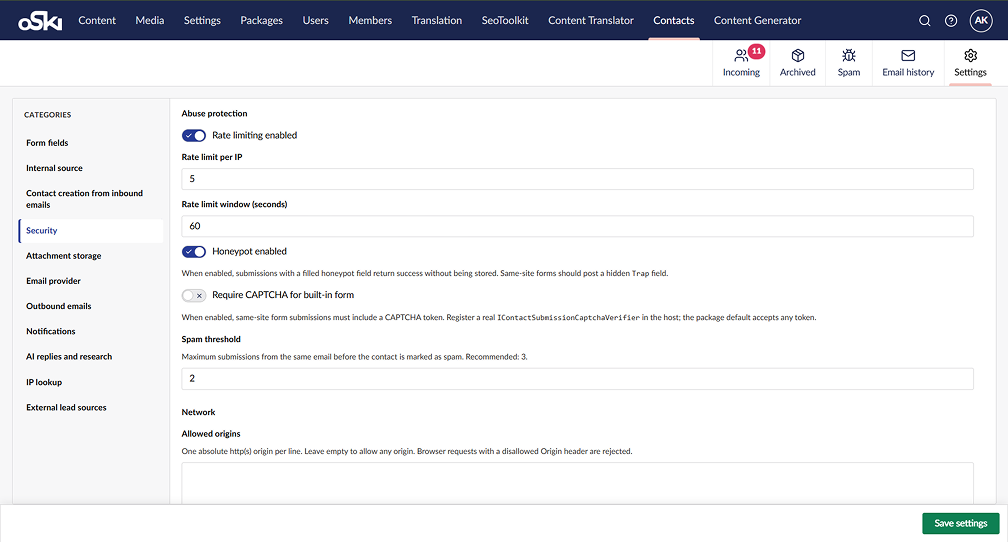
rate limiting
honeypot soft-accept
CAPTCHA hooks
payload size limits
allowed origins
automatic spam marking once a threshold is reached
All channels share one field catalog, the same security rules, and API keys. This makes the plugin suitable for both single-site and multi-site setups, including headless clients.
Email that keeps its context
Outbound: sent through SMTP or Postmark, using tokenized notification and thank-you templates.
Replies: written directly from the contact's workspace.
Attachments: stored locally or in Amazon S3.
Inbound: received through Postmark webhooks.
Email History: each message shows its status (Queued, Sent, Delivered, Bounced, Opened, or Spam complaint).
A CRM view inside the CMS
The Contacts section separates Incoming, Archived, and Spam, and includes:
search, filters, and bulk actions
activity badges
GeoIP lookup
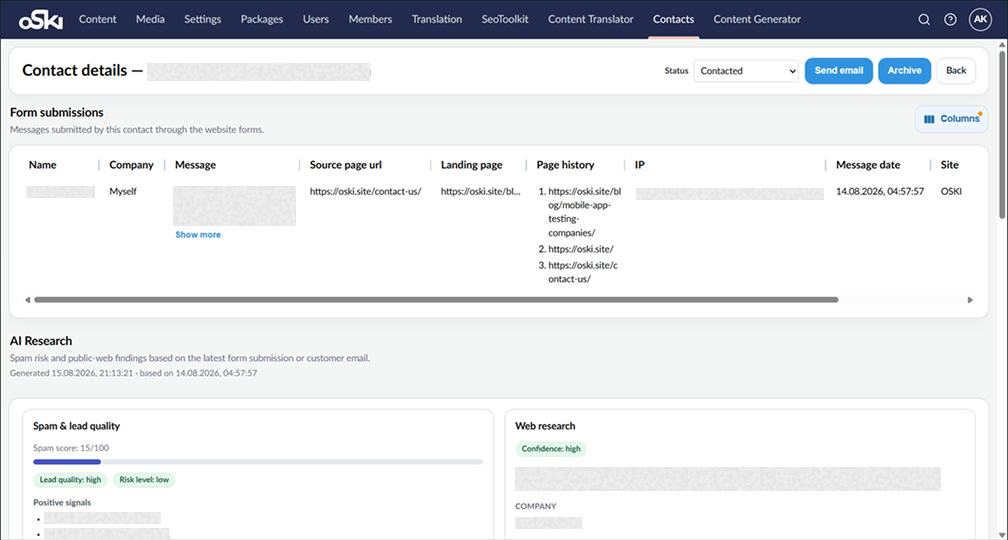
a detailed workspace for each contact with its submission and email history
Event-driven notifications, including Telegram, alert the team about new submissions, customer replies, and direct email leads.
Optional AI assistance
Reply drafting: done with OpenAI or Claude, using configurable instructions.
Lead intelligence: adds risk scoring, company and person context, and auto-research. It can also automatically archive low-quality leads. email history
Providers you can swap
AI, email transport, attachment storage, and notifications are built as interchangeable providers. Projects can pick services based on cost, operational preferences, or compliance requirements without touching the core.
Manage Umbraco Leads with umContactManager
Bring lead intake, spam protection, email history, and AI-drafted replies into the Umbraco backoffice. Installation takes minutes, with no core code changes.
Technology
Backend: C# on Umbraco CMS, with a provider-based architecture, a shared intake pipeline, and a modular backoffice plugin system
Frontend: Lit
AI: OpenAI API, Anthropic Claude API
Storage: Amazon S3
Email: Postmark / SMTP
Industry: Umbraco CMS
Released: 2026
Reported results
70% faster first reply. Intake, contact context, and outbound email sit in one workflow, with optional AI drafting.
65% less manual CRM work. There is less sorting of spam, chasing of email threads, copying of leads between tools, and rewriting of similar replies.
40% cleaner inbox. Spam filtering, auto-archiving, and activity tracking across Incoming, Spam, and Email History make real leads easier to see.
50% faster rollout of new channels. New sites, landing pages, and headless clients connect through external sources and one shared validation pipeline.
Setting it up
The plugin is available on the Umbraco Marketplace. Installation takes minutes and requires no changes to core code. After installing, give your user group access to the Contacts section and configure the settings: form fields, security, sources, email, notifications, and AI if needed.
Conclusion
umContactManager turns Umbraco into a complete lead management workspace. It combines multi-channel intake, layered spam protection, full email history with delivery statuses, and optional AI for replies and lead research. Because it is built on swappable providers, the plugin adapts to each project's existing setup.


